WordPress Speed Optimization
WordPress speed optimization for sites that feel slow
A slow site loses visitors before they read a word, especially on mobile. I find what is slowing your WordPress site down and clean it up, from oversized images to plugins you no longer need.
Speed work can cover
- Image compression and WebP
- Page and browser caching
- Plugin review and cleanup
- CSS and JavaScript optimization
- Mobile performance
- Before-and-after testing
Why it matters
Speed affects visitors, conversions and SEO
People on phones and slower connections do not wait long. Every extra second gives them a reason to go back to the search results and pick someone else.
I will not promise a specific PageSpeed score. Scores depend on hosting, the theme, third-party scripts and what the page needs to show. What I can promise is a careful look at what is actually slowing your site down and practical fixes for it.
- Pages take several seconds to load
- Mobile visitors leave quickly
- Poor Core Web Vitals in Search Console
- Heavy images and too many plugins
- A site that has grown messy over the years
What is included
What speed optimization includes
Each fix is chosen based on testing, not a generic checklist.
Image optimization
Resizing and compressing images so they look sharp without the extra weight.
WebP conversion
Serving modern image formats to browsers that support them.
Caching
Page and browser caching configured to suit your hosting and your site.
Plugin review
Finding plugins that are unused, duplicated or heavier than they need to be.
Asset optimization
Reducing and deferring CSS and JavaScript where it is safe to do so.
Mobile performance
Focusing on how the site loads on a phone, where it matters most.
Core Web Vitals
Working on loading, layout stability and responsiveness issues reported by Google.
Hosting considerations
An honest view on whether your hosting plan is part of the problem.
Performance testing
Tests before and after, so you can see what changed.
Process
How speed work runs
01
Test
Baseline tests on desktop and mobile.
02
Diagnose
Find the biggest causes of slow loading.
03
Optimize
Apply fixes carefully, checking nothing breaks.
04
Retest
Compare results and explain what changed.
Real results
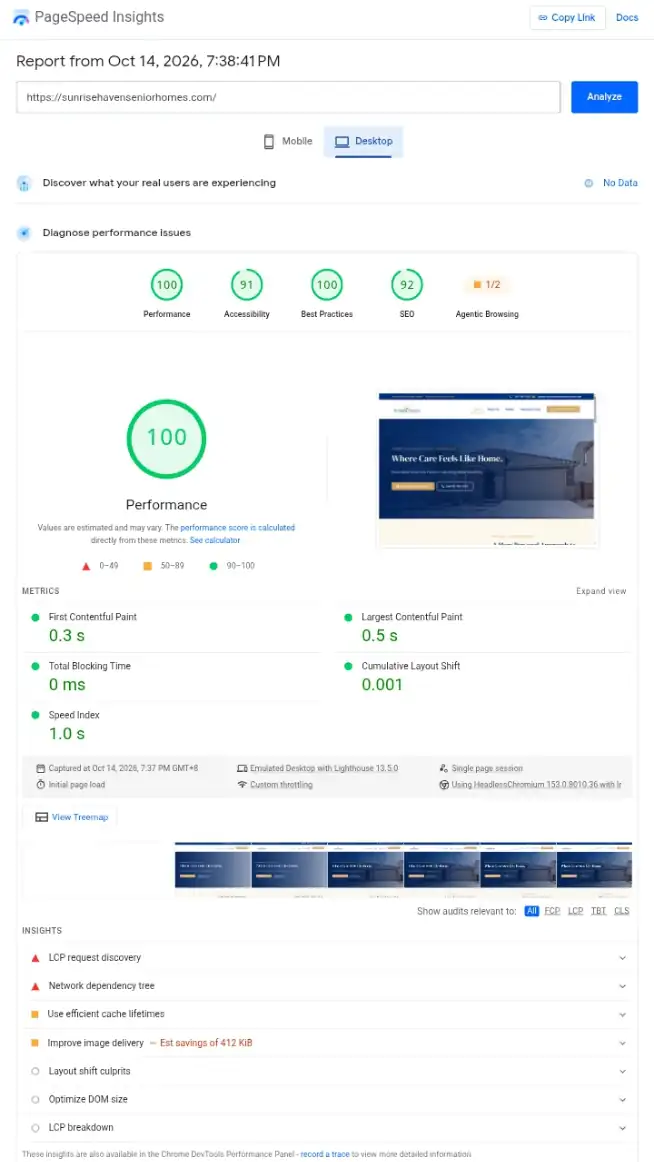
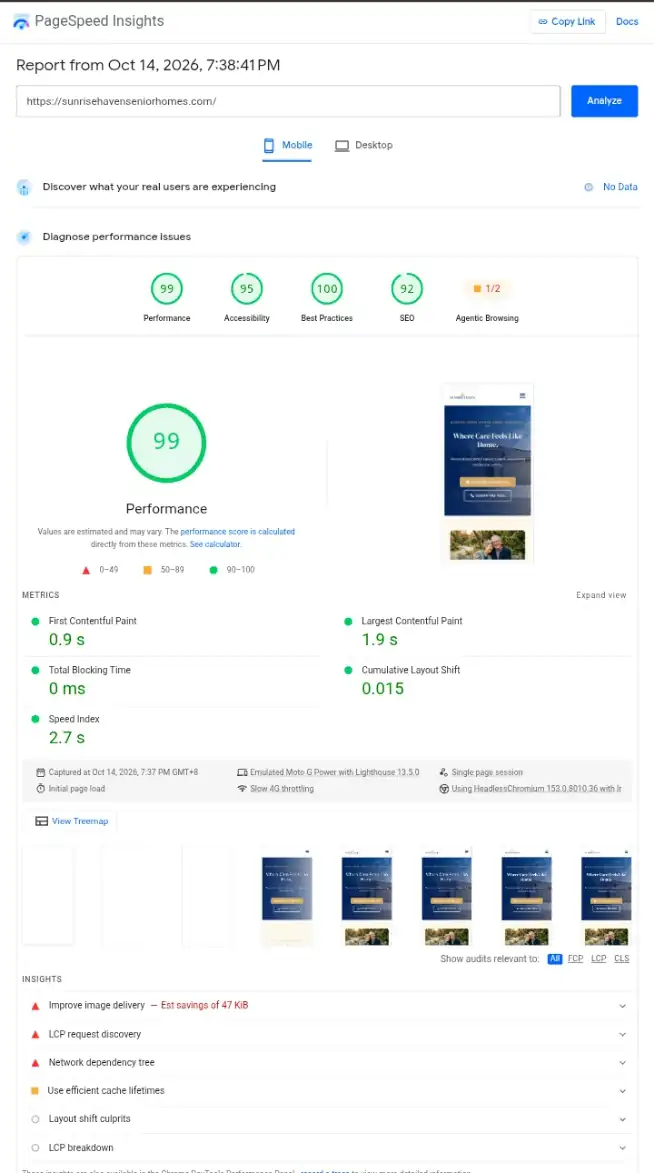
100 on desktop, 99 on mobile
These are Google PageSpeed Insights results for Sunrise Haven Senior Homes, a senior care home website I built in Goodyear, Arizona.
Every metric is in the green. The main content loads in 0.5 seconds on desktop and 1.9 seconds on slow mobile, with zero blocking time and almost no layout shift.
Desktop · Performance 100
Mobile · Performance 99
Relevant work
Built to load well on phones
Local detailing businesses get most of their visitors from phones, so these sites were built with mobile loading in mind.
FAQ
Speed optimization questions
Still have a question? Send me a message and I will get back to you.
Can you guarantee a 90+ PageSpeed score?
No. Scores depend on hosting, the theme, third-party scripts and the content on the page. I focus on real improvements and show you the before-and-after results.
Will speed work break my site?
Changes are made carefully and tested. I recommend a backup before any optimization work, and I can take one if your setup allows it.
Do I need better hosting?
Sometimes. If hosting is the main bottleneck, I will tell you rather than squeezing out small gains elsewhere.
Does site speed affect SEO?
Page experience is one of many factors Google looks at. A faster site mainly helps visitors stay, which is reason enough.
Often paired with
Related services
WordPress SEO
Technical and on-page SEO groundwork so search engines can crawl, understand and index your pages.
Website Redesign
Rebuild an outdated site with a cleaner structure while protecting the pages that already bring in traffic.
WordPress Maintenance & Support
Updates, content edits, troubleshooting and regular check-ins once your site is live.
Available for new projects
Is your WordPress site too slow?
Send me the URL. I will run some tests and tell you what I think is slowing it down.
Email danielelpa52@gmail.com
Phone / WhatsApp 0975 046 0198